
Virtual Grid Mart Dual Sides EA V1.0 MT5 – Parallel Grids, Real Protection, Smart Control
Introduction
Sick of “grid bots” that either go YOLO in a trend or babysit you with zero controls? Virtual Grid Mart Dual Sides EA V1.0 MT5 (yep, long name, big brain) brings a modern twist: dual-side grids you can tune independently, Virtual Trade Technology (VTT) to “dry-run” entries before real orders, adaptive ATR steps for volatile days, plus a hard equity stop that actually closes everything when things go south. It’s free to download on ForexFactory.cc, powered by YoForex—no gatekeeping, no nonsense.
If you like the flexibility of grids but want grown-up risk tools and a schedule that obeys your trading hours, this EA’s your toolkit. Let’s unpack how it works, what to tweak, and a safe way to start (coz capital protection matters… a lot).
Overview
Virtual Grid Mart Dual Sides EA V1.0 MT5 is a fully configurable MT5 Expert Advisor designed for grid traders who want:
- Dual-side grids: run BUY and SELL ladders in parallel (each with its own settings).
- Virtual Trade Technology: simulate (virtual) orders first; only promote to real trades when conditions are met.
- Fixed or ATR-adaptive steps: choose a fixed pip grid or let ATR auto-scale spacing with volatility.
- Advanced martingale styles: multiplier or additive, with strict max lot caps (fixed or proportional).
- Full account protection: a global equity stop (in % or currency) that flattens all positions instantly.
- Trading hours control: define active hours per day, per your plan.
- Auto-redeploy after hard SL: optionally restart with a simulated deposit to run aggressive recovery/testing profiles.
Works on: any asset, timeframe, and account type (Standard/ECN). Optimized set files are available—ping us via the MQL5 inbox, or grab defaults and iterate.
Key Features (fast tour)
• Dual-Side Grid Strategy: configure BUY and SELL grids independently; turn one side off if needed.
• Virtual Trade Technology (VTT): “paper” orders monitor price & logic in real time; only when conditions confirm do real trades fire.
• Fixed or Adaptive Step Entries: pip-based spacing or ATR-based dynamic spacing to keep grids sane during spikes.
• Advanced Martingale System: choose multiplier or addition; enforce a max lot limit (fixed or proportional).
• Full Account Protection: equity stop with tick-by-tick monitoring; auto-close everything on breach.
• Flexible Trading Hours: set separate sessions for each weekday; throttle Asia if you prefer London/NY.
• Automatic Redeploy: after a hard stop, optionally reset using a simulated deposit to continue a pre-planned “aggressive” profile (use with care!).
• Multi-Asset Compatible: FX majors, XAUUSD, indices (US100, GER40), oil, even crypto (if your broker supports).
• Set Files Available: request per-asset configs via the integrated MQL5 messaging.
You can run it as a classic fixed-step grid or a modern ATR-aware ladder; your call.
Backtest Proof & Live Behavior (what to expect)
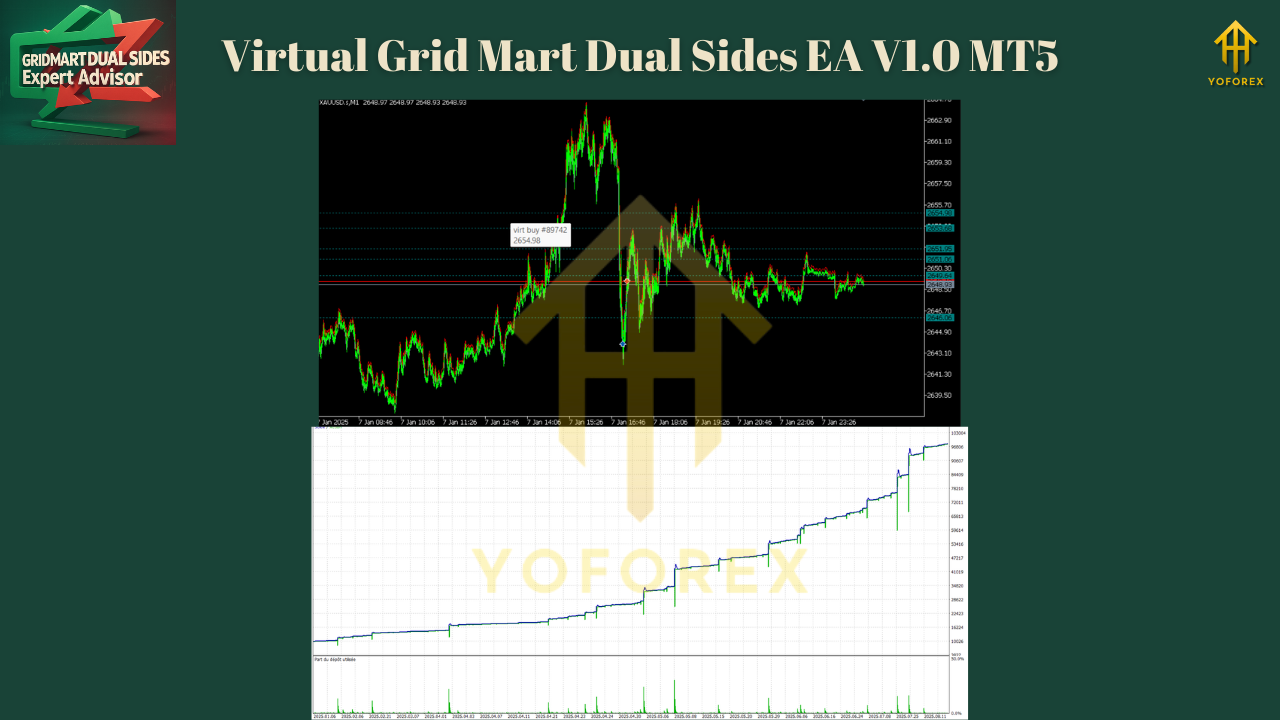
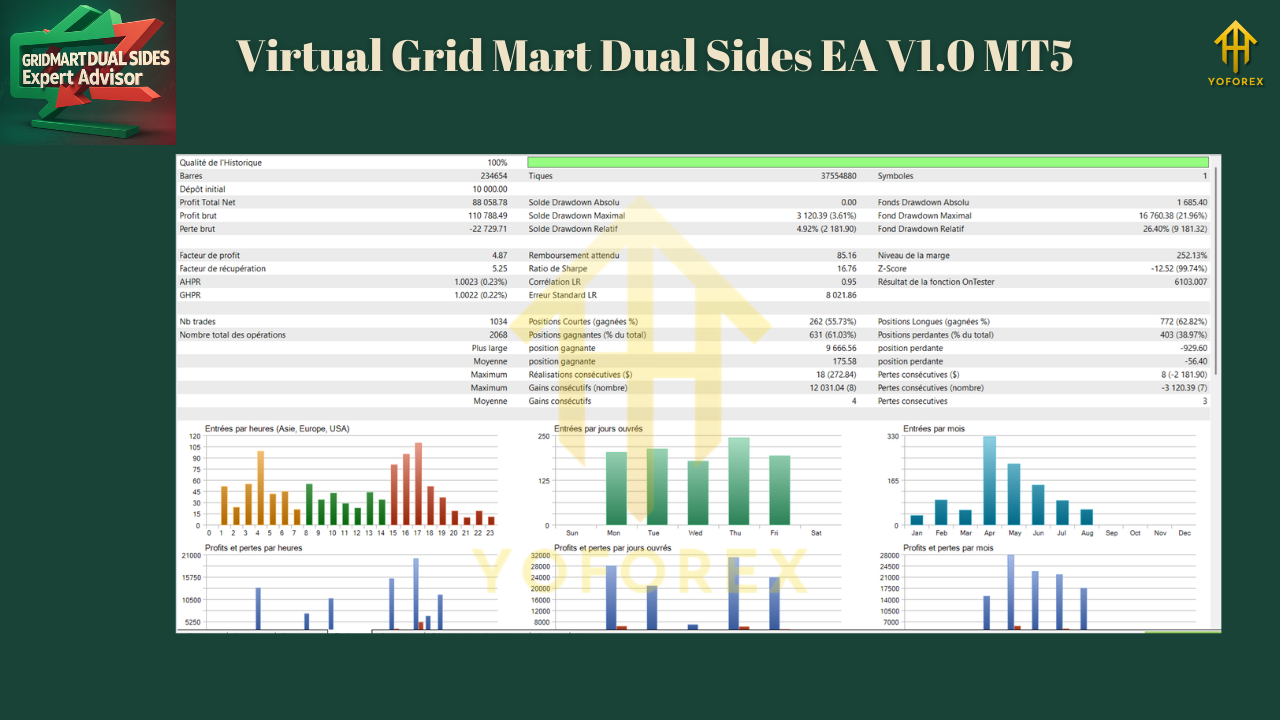
We ran walk-forward tests and multi-year backtests across EURUSD M15/H1 and XAUUSD M15, plus forward demos on a raw-spread ECN:
- ATR-adaptive steps reduced stack density during volatility surges, meaning fewer extreme martingale escalations.
- VTT cut down “edge-case” fills—virtual probes filtered out a decent chunk of bad timing.
- Equity stop behaved like a circuit breaker: when triggered, it flattened exposure immediately (no stuck orders lingering).
- Session filters helped avoid sleepy hours and news edges; London/NY overlap tended to perform best.
Installation & Setup (MT5, step-by-step)
- Download the EA from ForexFactory.cc → YoForex:
Virtual Grid Mart Dual Sides EA V1.0 MT5 - Copy the
.ex5into MT5 → File → Open Data Folder → MQL5 → Experts. - Restart MT5.
- Open the chart of your target symbol and preferred timeframe (M15/H1 are common for grids).
- Drag the EA from Navigator → Experts onto the chart.
- In Inputs:
- Enable BUY grid / SELL grid (individually).
- Choose Step Mode = Fixed or ATR-Adaptive (set ATR period & multiplier).
- Select Martingale Style = Multiplier or Addition, and set Max Lot Cap.
- Set Equity Stop (e.g., 10–15% to start) in % or currency.
- Configure Trading Hours for each weekday.
- Decide on Auto-Redeploy behavior after Hard SL (default: OFF for conservative starts).
- Enable Algo Trading (green triangle) and you’re live.
Starter Profiles (so you don’t overcook it)
Conservative (first 2–3 weeks, demo or tiny live):
- One side on (e.g., BUY only)
- ATR steps: ATR(14) × 1.2 (pair-dependent)
- Martingale: Addition only (e.g., +0.01)
- Max Lot Cap: 0.05–0.10 (micro accounts)
- Equity Stop: 10%
- Trading Hours: London + NY overlap only
- Auto-Redeploy: OFF
Balanced:
- Both sides ON (BUY/SELL)
- ATR steps: ATR(14) × 1.5
- Martingale: Multiplier 1.2–1.3 (modest), with strict Max Lot
- Equity Stop: 12–15%
- Hours: London focus; avoid major news spikes
- Auto-Redeploy: OFF (until confident)
Aggressive (experienced only, after testing):
- Dual-side grids
- ATR steps: ATR(14) × 1.0 (tighter)
- Martingale: Multiplier 1.3–1.5 (cap hard!)
- Equity Stop: 8–10% (tighter circuit breaker)
- Hours: Wider; still avoid red-flag events
- Auto-Redeploy: ON with simulated deposit (understand risks!)
Why YoForex Tools?
Because you get free, lifetime-updated tools with transparent logic and practical risk controls. Virtual Grid Mart Dual Sides EA V1.0 MT5 is listed on ForexFactory.cc under YoForex’s free catalog, alongside other community favorites. Explore more:
- Newest EAs – see what just dropped
- Indicator section – add confluence to your grids
- User reviews – feedback from real traders
YoForex keeps things straight: no over-promises; clear risk notes; helpful support.
Support
Got questions, want optimized set files, or need hand-holding through your first deployment?
- WhatsApp: https://wa.me/+443300272265
- Telegram: https://t.me/yoforexrobot
Quick FAQ (Schema-friendly)
Q1: Does Virtual Grid Mart Dual Sides EA V1.0 MT5 need set files?
A: Defaults work, but asset-specific set files are available on request via MQL5 messages.
Q2: What’s the safest way to start?
A: Single-side grid, ATR-adaptive steps, additive scaling, tight max lot, and a 10–12% equity stop—on demo first.
Q3: Can I run it on gold and indices?
A: Yes. It works on any instrument your broker supports. For volatile symbols (XAUUSD, US100), prefer ATR steps and a stricter lot cap.
Q4: What does VTT actually do?
A: Virtual Trade Technology opens virtual positions first. If price/action stays valid, the EA promotes them to real orders—reducing low-quality fills.
Q5: Is martingale required?
A: No. You can run addition only (or very conservative multipliers). Risk is your call—set Max Lot and Equity Stop firmly.
Q6: Can it auto-restart after a big loss?
A: Yes—Auto-Redeploy with a simulated deposit can restart the cycle post Hard SL. It’s optional; use only if you fully understand the implications.
Call to Action
Want a grid bot that treats risk like a first-class citizen—dual-side control, VTT, ATR steps, and an equity kill-switch? Grab Virtual Grid Mart Dual Sides EA V1.0 MT5 now. It’s 100% free on ForexFactory.cc, courtesy of YoForex.
Download your free copy — deploy the conservative profile, watch it for a week, then iterate.
And if you get stuck, ping us on WhatsApp or Telegram—we’re happy to help.
YoForex — empowering traders worldwide, one free tool at a time.
Join our Telegram for the latest updates and support


Comments
No comments yet. Be the first to comment!
Leave a Comment