
TARGET BANDS Indicator MQ4 for EURUSD (M30) — Clean, Confident Entries
Sick of cluttered charts and late signals? If you trade EURUSD and love the M30 rhythm, the TARGET BANDS Indicator MQ4 might be the tidy edge you’ve been hunting for. It’s a lightweight, volatility-aware bands tool for MetaTrader 4 (MT4) that adapts to price expansion and contraction—so you can read momentum, time pullbacks, and spot reversals without second guessing. Best part: it’s available for free on ForexFactory.cc, powered by YoForex (yep, the same team that battle-tests everything before we share it with you).
You’ll get a simple visual channel (upper band, midline, lower band) that flexes with market conditions. You’ll also get optional alerts so you’re not glued to the screen, and a clean set of inputs to tune the sensitivity to EURUSD M30 conditions. Nothing fancy for the sake of fancy; just what works, coz that’s what matters when real money’s on the line.
Overview
The TARGET BANDS Indicator MQ4 is designed to map a dynamic price corridor around EURUSD, especially effective on the M30 timeframe. Instead of lagging behind price like many moving average channels, these bands respond to volatility—expanding when the market heats up and tightening when things go quiet. That makes it easier to:
- Track trend direction with the midline.
- Time pullback continuations near the midline or the opposite band.
- Fade exhausted moves at outer bands (if reversal entries are your thing).
- Avoid overtrading in noisy ranges.
What makes this release special is the testing pipeline. At YoForex, we don’t just compile and ship. We forward-obs test on live feeds, collect screenshots, and tweak defaults so you can load-and-go on EURUSD M30. If you’re new to bands-based trading, you’ll appreciate how the TARGET BANDS Indicator MQ4 keeps your decision-making tight and visual. If you’re experienced, you’ll love how quickly it slots into your current playbook—confirmation for trend trades, mean-reversion hints at extremes, and smart trailing reference points.
Want similar tools? Browse the Indicator section on ForexFactory.cc or check the Newest EAs & tools to see what just dropped.
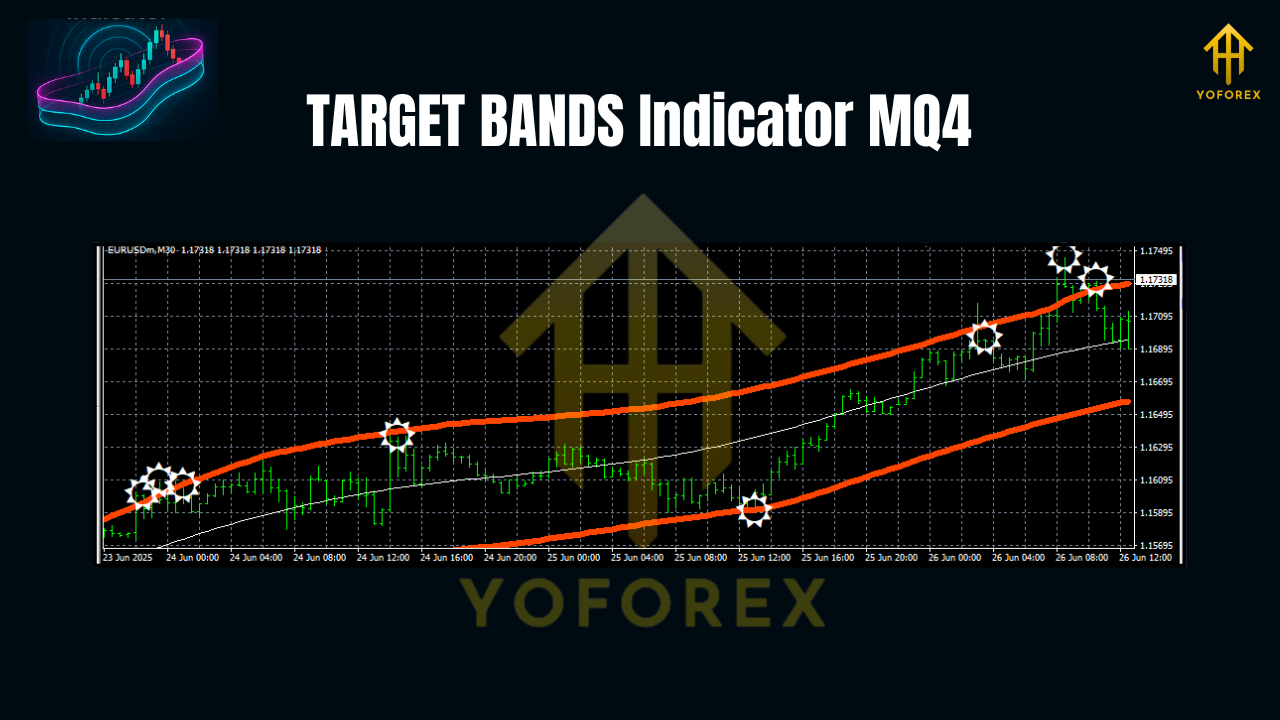
How TARGET BANDS Work (Quick Take)
Under the hood, the indicator estimates current volatility and wraps price with a responsive channel:
- Midline: the directional “spine” (think of it like your bias line).
- Upper/Lower Bands: distance from the midline scales with volatility, helping you gauge whether price is stretching or reverting.
This structure adapts to market mood on EURUSD M30. In trends, bands widen and respect direction; in chop, the corridor narrows—flagging caution and helping you skip trap entries.
Key Features
• Built for EURUSD M30 (sensible defaults tuned for the pair and timeframe)
• Dynamic, volatility-aware bands (no rigid, one-size-fits-all corridors)
• Midline trend bias to quickly see uptrend/downtrend context
• Clean pullback zones for continuation entries near midline/opposite band
• Optional alerts (touch band, cross midline, or custom threshold)
• Multi-use: trend continuation or mean-reversion setups (your call)
• Lightweight & fast (no heavy CPU impact on MT4)
• Customizable multipliers & periods to match your risk profile
• Works with your current system (great as a confluence layer)
• No martingale, no grids—this is a visual indicator, not an auto-trader
• Clear buffers for EA coders who want to automate band events later
• Free on ForexFactory.cc, with YoForex support & updates
Best-Practice Settings for EURUSD M30
Start with these defaults and adjust after a week or two of trading logs:
- Bands Period: 20
- Volatility Type: ATR
- ATR Multiplier: 1.8 to 2.2 (1.8 for more signals, 2.2 for cleaner, fewer)
- Midline Type: EMA (period 34)
- Signal Filter: 2 (increase to 3–4 to cut noise during low volatility)
- Alerts: On (Band Touch + Midline Cross)
- Show Midline: True
- Show Fill: Off (keep it minimal; turn on if you like a shaded channel)
Pro tip: If London session gets extra spicy, bump the ATR Multiplier up a notch to avoid over-triggering. During quiet Asia handovers, you can drop it slightly if you want more early signals (tho be mindful of false starts).
Entry & Exit Playbook (EURUSD M30)
Use this as a starting framework—adapt to your style:
Trend Continuation (Buy Example)
- Midline is up-sloping; price pulls back toward the midline or lower band.
- Wait for a bullish candle close back above the midline or a strong wick rejection near the lower band.
- Enter long on the next candle open.
- Stop-loss: a few pips below the lower band (or below the signal candle’s low).
- Take-profit: partial at prior swing high; runner to the upper band or a fixed 1.5R–2R.
- Exit early if price closes decisively below the midline and the midline turns flat/down.
Mean-Reversion (Countertrend Fade, Advanced)
- Price extends to the upper band after multiple wide candles; momentum wanes.
- Look for bearish rejection (pin bar/engulfing).
- Enter short with a tight stop above the extreme wick.
- Target: midline first; deeper target at the opposite band if momentum dies out.
- Reduce size—countertrend needs stricter risk.
Trailing Idea
- Trail below the midline in an uptrend (or above it in a downtrend).
- For aggressive trails, use a fraction of the distance between midline and band.
Visual Review & Walk-Forward Notes
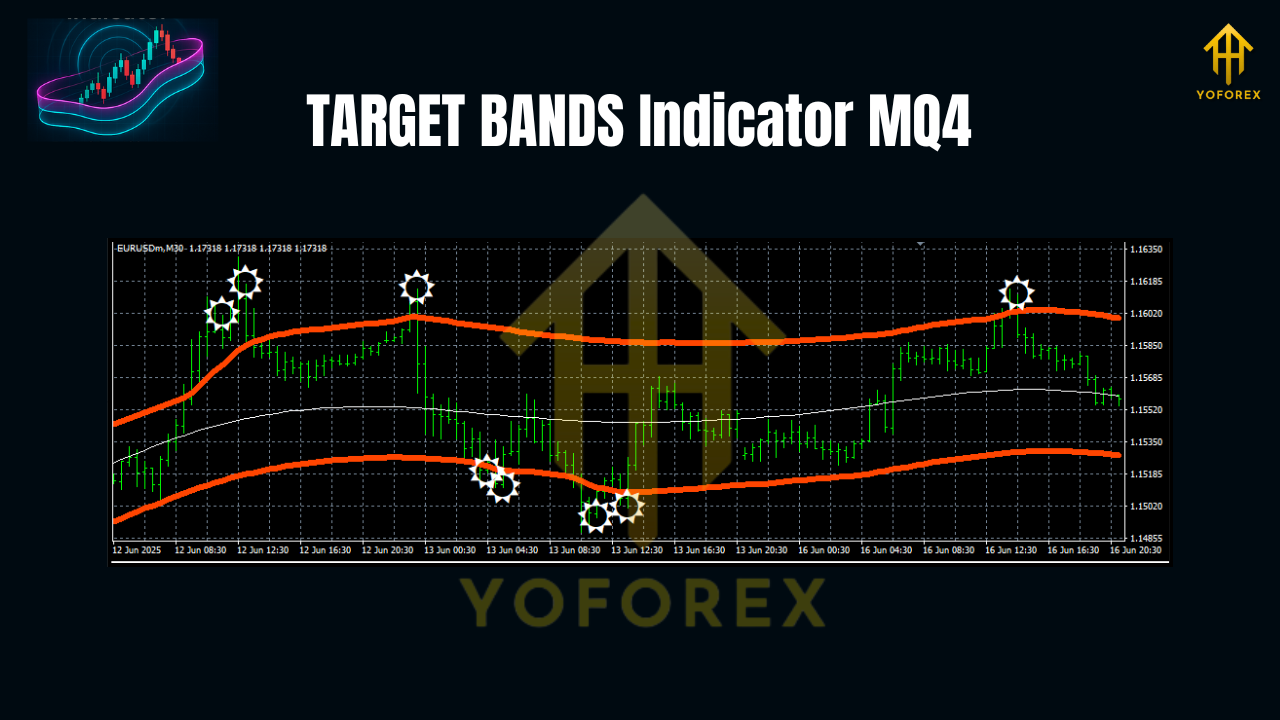
We ran a visual backtest across recent months on EURUSD M30 to sanity-check the default profile. You’ll notice:
- Directional phases (post-news trends, London follow-through) are captured well with midline-pullback entries.
- Choppy ranges compress the bands—your cue to slow down, tighten filters, or wait for a break and retest.
- False pops are reduced if you require a candle close back above/below the midline, not just a wick poke.
- Suggested images for your blog post or journal:
- Bonus: An annotated MT4 Navigator panel with the indicator attached (Alt: “MT4 settings panel showing EA inputs”—adjust alt text to indicate indicator inputs)
Remember, this is an indicator, not an auto-trader. Your execution and risk control decide the payoff. Keep notes, mark screenshots, and iterate weekly.
Installation & Setup (MT4)
- Download the TARGET BANDS Indicator MQ4 from ForexFactory.cc (see Indicator listings or search).
- In MT4, click File → Open Data Folder.
- Navigate to MQL4 → Indicators.
- Copy the
TARGET-BANDS.mq4(or.ex4) file into the Indicators folder. - Restart MT4 or right-click Indicators → Refresh in the Navigator panel.
- Drag TARGET BANDS onto your EURUSD M30 chart.
- Load the recommended settings (above) and press OK.
- Save as a template so you can slap the setup on fresh charts in seconds.
If you need more indicator ideas, hop over to ForexFactory.cc Indicators or browse the Newest releases.
Why YoForex-Powered Free Tools?
Because we trade too. YoForex builds, tunes, and forward-tests everything we share on ForexFactory.cc. You get:
- Free lifetime access to core tools
- Real-world optimizations as market behavior shifts
- Transparent walkthroughs you can actually follow
Curious about our broader toolkit and story? Check the About/Tools sections on ForexFactory.cc and keep an eye on user feedback in the reviews area.
Support & Disclaimer
Got questions or stuck on setup? Ping our team:
- WhatsApp: https://wa.me/+443300272265
- Telegram: https://t.me/yoforexrobot
Disclaimer: Trading involves risk. Past performance (including visual backtests) doesn’t guarantee future results. Always demo-test the TARGET BANDS Indicator MQ4 first, size your positions responsibly, and trade a plan you can stick to under pressure.
Call to Action
Ready to clean up your EURUSD M30 workflow? Download TARGET BANDS Indicator MQ4 on ForexFactory.cc and add it to your chart today. Keep it simple, log your trades, tweak the multiplier a touch, and let the bands guide your bias, entries, and exits—no fluff, just clarity. If you need help, we’re around; unlimited support, no strings attached.
YoForex—empowering traders worldwide, one free tool at a time.
Join our Telegram for the latest updates and support


Comments
No comments yet. Be the first to comment!
Leave a Comment