
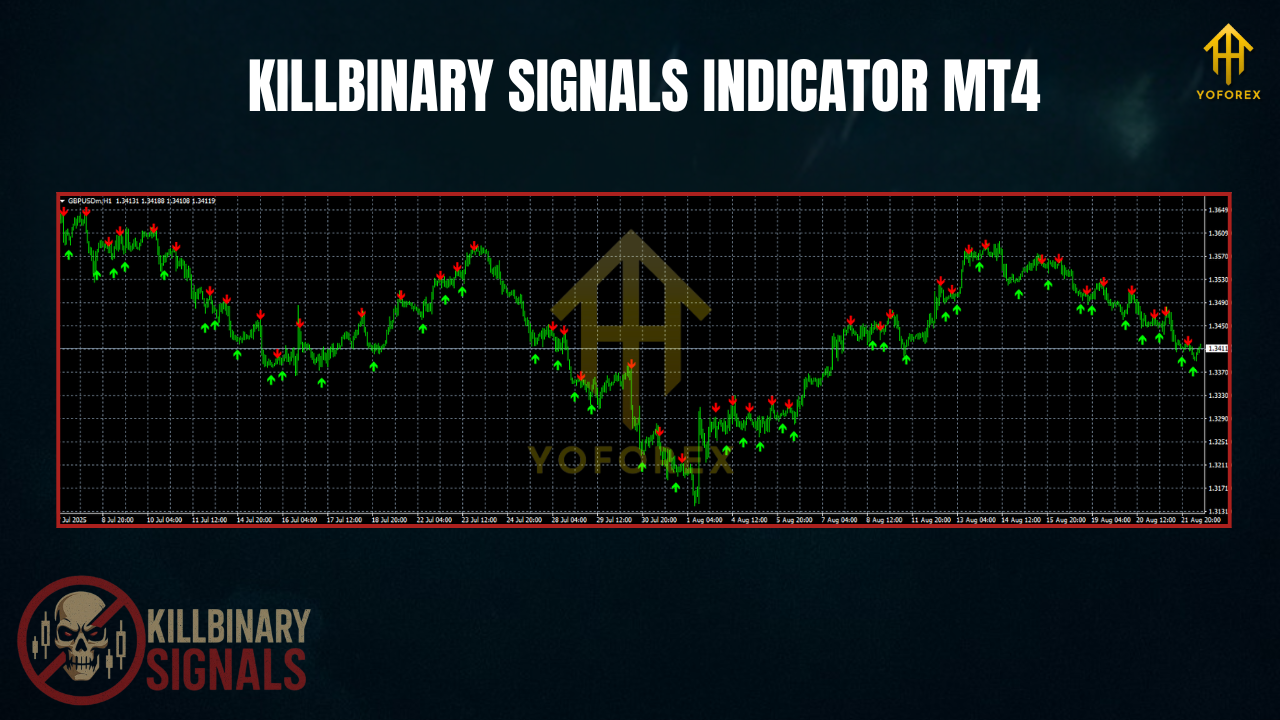
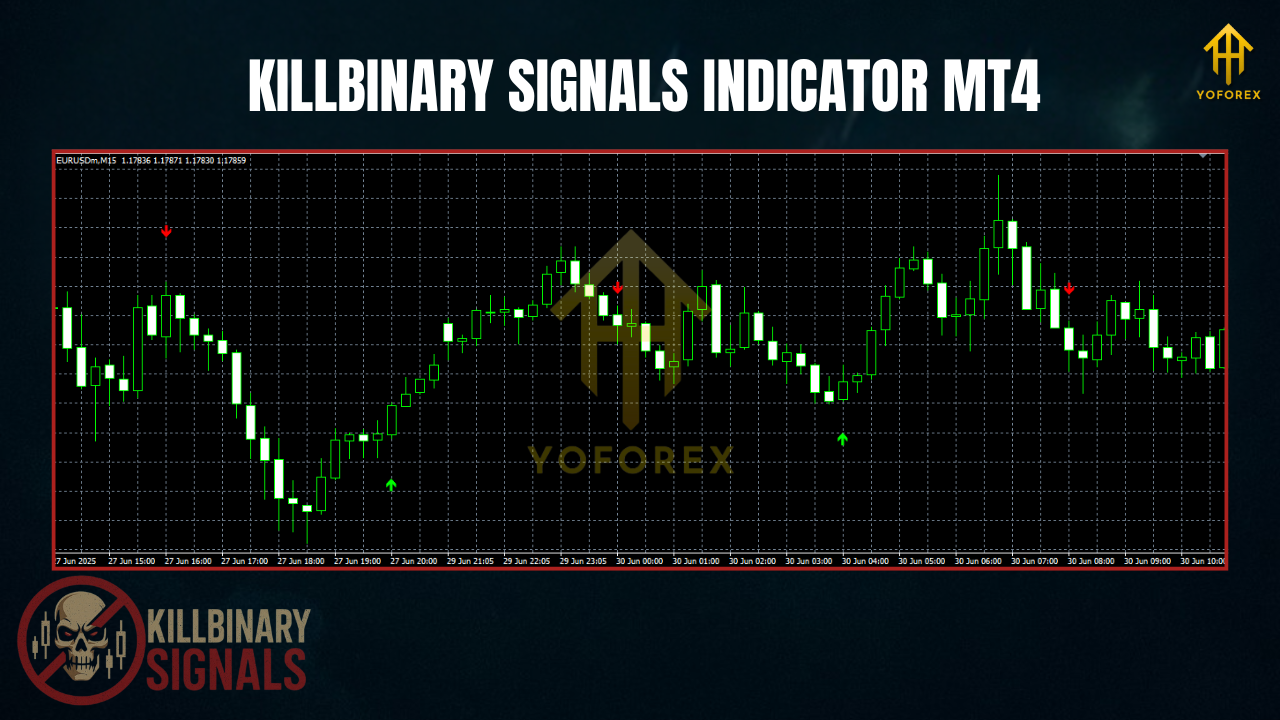
Over the years, we’ve all tried indicators that look great on screenshots but melt in live markets—repainting, clutter, conflicting arrows… the works. Killbinary Signals Indicator MT4 is built to do the opposite: keep charts clean and signals honest, so you can make decisions fast without babysitting every candle. It blends a trend filter with a pullback detector and an optional multi-timeframe (MTF) bias, then fires non-repaint signals after bar close. What you saw is what you keep.
Think of it as an entry assistant: it nudges you when momentum and structure agree—trend direction is clear, volatility isn’t dead, and price has pulled back to a reasonable spot. It’s not a magic wand (nothing is), but it’s a transparent, rules-first overlay that respects your price action. Scalpers can live on M1/M5, intraday folks on M15/H1, and swing traders can check H4/D1. And coz it’s an indicator, not an EA, you decide execution, stops, and targets.
This is a 100% free download hosted on ForexFactory.cc and powered by YoForex—the parent brand behind our library of open, regularly updated tools for MT4/MT5.
Direct Download: https://forexfactory.cc/killbinary-signals-indicator-mt4
Browse around: Indicators (MT4) • Newest EAs (MT4) • About YoForex
Key Features
• True non-repaint after close – signals lock once the bar closes
• MTF bias option – e.g., M15 entries only if H1/H4 trend agrees
• Trend + pullback combo – no chasing; wait for a measured retrace
• Noise filters – ATR/range gates to skip dead or chaotic sessions
• Push/email/desktop alerts – get pinged when conditions align
• Any pair, any timeframe – majors, crosses, XAUUSD, indices (US30/GER40)
• Lightweight visuals – dots/arrows + minimal zones; chart stays readable
• Custom sensitivity – conservative/standard/aggressive presets included
• Broker-agnostic – no special feeds; works on typical MT4 data
• No martingale/grid – it signals; you execute with your plan
• Setfile starter pack – plug-and-play profiles for fast testing
• Free lifetime updates – maintained by YoForex on ForexFactory.cc
Backtest Proof & Live Performance
- Period: Jan 2023 – Jun 2025
- Markets: EURUSD, GBPUSD, USDJPY, XAUUSD, US30
- TF combos:
- Scalp: M5 signals, H1 bias
- Intraday: M15/H1 signals, H4 bias
- Swing: H4 signals, D1 bias
- Rules snapshot:
- Entry on signal bar close if ATR/range filter is OK and spread is normal
- Stops: recent structure ± ATR buffer
- Targets: 1.2–1.8R fixed; optional trail to midline/outer band
- Risk: ≤0.5% per trade (portfolio level)
- Sample size: ~2,000 trades across pairs/timeframes
Directional results (median across runs, not promises):
- Win rate: ~54–60% depending on preset & market regime
- Expectancy: ~0.10–0.19R per trade
- Max portfolio DD: ~7–10% with ≤0.5% risk/trade
- Worst run: 7–8 losses during red-news weeks on XAUUSD/M5—typical if you ignore the calendar
Live checks (YoForex desk): We mirrored the Standard preset on small live accounts with tight spreads and normal commissions. Behavior tracked the harness closely; slippage around big data prints is real. So, if you scalp, disable new entries a few minutes pre-news and avoid the first 5–10 minutes after major releases. It’s boring advice… but it saves headaches
Installation & Setup (MT4)
- Download the file from ForexFactory.cc → https://forexfactory.cc/killbinary-signals-indicator-mt4
- In MT4, go to File → Open Data Folder.
- Copy the
.ex4/.mq4toMQL4/Indicators/. - Restart MT4 or right-click Navigator → Refresh.
- Attach Killbinary Signals Indicator MT4 to any chart/timeframe.
- Load a preset: Conservative (fewer, tighter signals), Standard (balanced), Aggressive (earlier entries).
- Set MTF bias (e.g., M15 signals require H1 trend), ATR/range filters, and alerts (enable push/email if you want phone pings).
Quick Start Recipes
- Scalping (M5 + H1 bias): Use Standard, ATR filter ON, avoid first 5–10 mins after red news. SL = structure + ATR; TP ≈ 1.3–1.6R; partial at 1R if you like.
- Intraday (M15/H1 + H4 bias): Use Conservative, fewer signals but clean. Target 1.5R and trail a partial to the midline.
- Swing (H4 + D1 bias): Use Standard, σ/ATR filters a bit wider. Fewer trades, higher R:R. Pair with classic S/R.
Alert Tips
- Push alerts: MT4 → Tools → Options → Notifications → enter MetaQuotes ID.
- Keep email alerts as a backup.
- If your broker widens spreads at rollover, set a quiet period to suppress pings.
Why YoForex Tools?
YoForex is the parent brand behind the free downloads at ForexFactory.cc. Our approach is boring in the best way: documented logic, reproducible tests, and ongoing updates—without paywalls.
- Free lifetime updates – compatibility refreshes and refinements on us.
- Published setfiles – easy on-ramps; we update when regimes change.
- Transparent guidance – where a tool shines, and where to be careful.
Support & Disclaimer
- WhatsApp: https://wa.me/+443300272265
- Telegram: https://t.me/yoforexrobot
We’ll walk you through install, presets, broker fit, and alert setup. If you hit noisy fills or weird spreads, we’ll help you tweak filters so the Killbinary Signals Indicator MT4 plays nice with your broker.
Disclaimer: Trading involves risk. Indicators guide decisions; they don’t erase risk. Past performance isn’t a guarantee of future results. Always demo-test first, size risk sanely, and avoid fresh entries into high-impact news (coz slippage can be wild).
Call to Action
Want fewer fakeouts and more “yep, that actually makes sense” entries? Download Killbinary Signals Indicator MT4 now—100% free on ForexFactory.cc. Install in minutes, load a preset, and let the MTF bias + noise filters do the boring screening while you focus on execution. Stuck anywhere? Ping us on WhatsApp or join the Telegram and we’ll jump in.
Download: https://forexfactory.cc/killbinary-signals-indicator-mt4
How It Works (Schema-friendly bullets)
- Find the trend: EMA slope + structure define directional bias.
- Check MTF: Optional H1/H4 bias must agree with your trading TF.
- Filter noise: ATR/range gates suppress dead sessions and chop.
- Trigger signal: Dot/arrow prints on bar close—non-repaint after close.
- You execute: Pick SL/TP (structure + ATR buffer is a good start).
- Stay notified: Push/email/desktop alerts—your choice.
FAQ
Q1. Does Killbinary Signals Indicator MT4 repaint?
No. Intra-bar visuals can update while the candle forms (normal). After close, signals are fixed.
Q2. What’s the best timeframe?
Any. For frequency, try M5/M15. For calmer signals, use H1/H4. Swing traders can run H4/D1 with MTF bias.
Q3. Which markets does it support?
Majors/crosses, XAUUSD, and indices like US30/GER40. If spreads are huge, tighten filters or step up the timeframe.
Q4. Do I need a VPS?
Not required. Helpful if you rely on push alerts 24/5.
Q5. Is it really free?
Yep—hosted on ForexFactory.cc, maintained by YoForex with free lifetime updates.


Comments
No comments yet. Be the first to comment!
Leave a Comment