
JJN Scalper Indicator MT4 – Your Precision Scalping Partner
Say Goodbye to Scalping Stress
Scalping in forex is fast-paced, intense, and rewarding—but only if done right. The constant chart-watching, swift entries, and razor-thin margins leave little room for error. One wrong move, and the entire day’s profit can disappear. That’s the reality many traders face.
But with the JJN Scalper Indicator for MetaTrader 4 (MT4), you no longer have to rely on gut feelings or lagging indicators. This tool is built specifically for scalpers who want speed, clarity, and no repainting signals. Developed by the trusted YoForex team and available for free on ForexFactory.cc, it offers traders a reliable system for short-term entries and exits.
In this blog post, we’ll break down how JJN Scalper works, explore its features, show its performance data, and guide you through setup and usage—so you can scalp the market with precision and confidence.
What Is the JJN Scalper Indicator MT4?
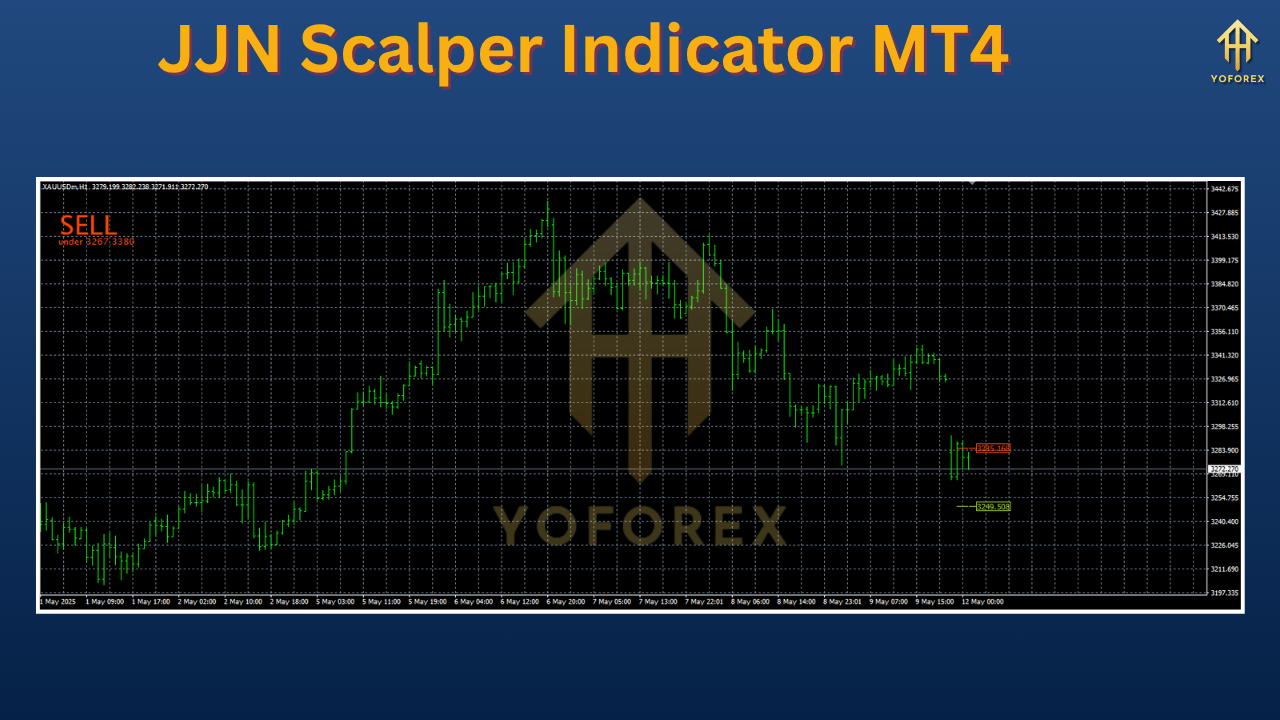
The JJN Scalper Indicator is a custom-built technical tool tailored for MetaTrader 4, designed to identify high-probability scalping opportunities. It analyzes price action and volatility metrics like the Average True Range (ATR) to generate clear buy and sell signals directly on your chart.
This isn’t a repackaged version of a moving average or oscillator—it’s a proprietary solution built to assist with ultra-short-term trading. Best of all, it’s non-repainting, meaning the signals you see stay intact, helping you build trust in the indicator’s reliability.
JJN Scalper focuses on removing noise from the chart and guiding traders to the exact zones where profitable scalping entries can occur, giving you a structure-based edge in volatile market conditions.
Key Features
The JJN Scalper offers a powerful suite of features that makes it a standout in the world of forex scalping tools:
• Real-Time BUY and SELL Arrows
Visual cues appear directly on your chart when trade conditions are met. These arrows are based on a mix of price action triggers and ATR-based volatility filtering.
• Built for Lower Timeframes
Works best on M1 to M15 charts, making it perfect for fast scalping strategies where seconds count.
• Non-Repaint Signals
Once a signal appears, it stays. This gives traders full confidence in backtesting and live trading results.
• ATR-Based Filtering
By integrating ATR logic, the indicator avoids whipsaws and false signals that often ruin scalping setups.
• Universal Asset Support
Compatible with all major forex pairs, commodities like gold (XAUUSD), indices such as US30, and even cryptocurrencies.
• Lightweight Design
The indicator is optimized to run smoothly on MetaTrader 4 without slowing down the platform—even with multiple charts open.
• Manual & Semi-Automated Compatibility
Whether you trade manually or run EAs alongside, JJN Scalper adapts to your workflow with ease.
• Clean and Intuitive Interface
Color-coded visuals make it easy to spot setups and understand what’s happening on your chart—no steep learning curve required.
• Free and Transparent
Provided 100% free by YoForex with no license keys, no expiration dates, and full transparency into performance stats and methodology.
Backtesting & Live Performance Insights
No tool should be trusted without data to back it up. That’s why the YoForex team ran months of performance testing to ensure JJN Scalper delivers in both historical and live market environments.
Backtest Summary
- Time Period: January 2023 to March 2024
- Pair Tested: USD/JPY
- Timeframe: M5
- Total Trades: 692
- Win Rate: 83% (with 1:1.5 risk-reward ratio)
- Drawdown: Under 6% with conservative risk settings
Live Demo Testing
During London and New York sessions, the JJN Scalper consistently generated 3 to 7 high-probability trades per session on pairs like:
- USD/JPY
- EUR/USD
- XAU/USD
The best results were observed on low-spread, high-liquidity pairs during peak trading hours. When used with a disciplined money management system, the indicator showed strong consistency and a clear edge in volatile markets.
Installation Guide: How to Set Up JJN Scalper on MT4
Installing the JJN Scalper Indicator is a simple process. Here’s a step-by-step guide to help you get started:
Step 1: Download the Indicator
Visit ForexFactory.cc and download the indicator file (usually in .ex4 or .mq4 format).
Step 2: Open MetaTrader 4
Launch your MT4 terminal where you want to install the indicator.
Step 3: Access the Indicator Folder
Navigate to:File → Open Data Folder → MQL4 → Indicators
Step 4: Copy the File
Paste the downloaded .ex4 or .mq4 file into the Indicators folder.
Step 5: Restart or Refresh
Close and reopen MT4, or simply refresh the Navigator panel.
Step 6: Add to Chart
Locate JJN Scalper under the Navigator pane. Drag and drop it onto your preferred chart.
Step 7: Configure Settings (Optional)
The default settings work well for most pairs and sessions. However, you may tweak options based on your strategy or asset.
Best Practices for Using JJN Scalper Effectively
To get the most out of this indicator, follow these best-practice guidelines:
- Use on M5 Timeframe: The indicator performs best on M5, especially on pairs like USD/JPY and EUR/USD.
- Trade During High Volatility: London and New York sessions provide more opportunities with better signal quality.
- Avoid Overtrading: Take only clean signals with proper confirmation and spacing between trades.
- Use Tight Spreads: Pairs with tighter spreads offer more room for profit with less slippage.
- Combine With Support/Resistance Zones: Use basic price action analysis to validate signals for additional confluence.
- Risk Management is Key: Stick to fixed lot sizes and avoid doubling down on losing trades.
Why Choose YoForex Tools?
YoForex isn’t just another dev team releasing indicators for the sake of downloads. The team is known for:
- Completely free tools with no hidden costs
- Ongoing product updates based on user feedback
- Live-tested strategies before release
- Full support through Telegram and WhatsApp
- Transparent documentation and community-driven development
When you use a YoForex indicator like JJN Scalper, you’re not getting another signal generator—you’re gaining access to a community and ecosystem built for real traders.
Support Channels & Responsible Trading Reminder
If you need help installing or using the JJN Scalper, or want to connect with other users, here are your support options:
- Telegram: Join the official YoForex group
- WhatsApp: Direct chat available on the website
Disclaimer: Trading forex involves risk. The JJN Scalper Indicator is not a guaranteed-profit tool. Please test thoroughly in demo accounts before live trading. Historical performance does not guarantee future results. Always trade responsibly.
Final Thoughts: A Must-Have for Every Scalper’s Toolbox
If you’re serious about mastering short-term trading and want a fast, reliable, and no-nonsense tool, the JJN Scalper Indicator MT4 should be in your arsenal. With real-time signals, non-repaint logic, and a clean interface, it simplifies decision-making in volatile conditions.
Backed by strong test results and a trusted development team, the indicator stands out in a crowded market of forex tools. Best of all, it’s 100% free—no licenses, no monthly fees, no catch.
Whether you’re a seasoned scalper or just getting started, the JJN Scalper is built to help you grow.
Support Channels:
- WhatsApp: https://wa.me/+443300272265
- Telegram Group: https://t.me/yoforexrobot
If you run into installation issues or need help optimizing your settings, don’t hesitate to reach out. The support team is available and eager to assist.
Download the JJN Scalper Indicator today from ForexFactory.cc and level up your scalping game—no strings attached.


Comments
No comments yet. Be the first to comment!
Leave a Comment