
Introduction to the FXTT Fx Scanner Indicator V2.0 MT4
Forex trading thrives on precision, strategy, and the right tools. The FXTT Fx Scanner Indicator V2.0 for MetaTrader 4 (MT4) is a powerful, user-friendly tool designed to help traders identify high-probability trading opportunities across major currency pairs like EUR/USD, GBP/USD, and USD/JPY on the H1 (1-hour) timeframe. Whether you're a beginner or an experienced trader, this upgraded indicator offers a streamlined way to analyze market conditions, spot trends, and make informed trading decisions. This blog post will explore the features, installation process, trading strategies, and benefits of the FXTT Fx Scanner Indicator V2.0, along with tips to maximize its potential.
What is the FXTT Fx Scanner Indicator V2.0?
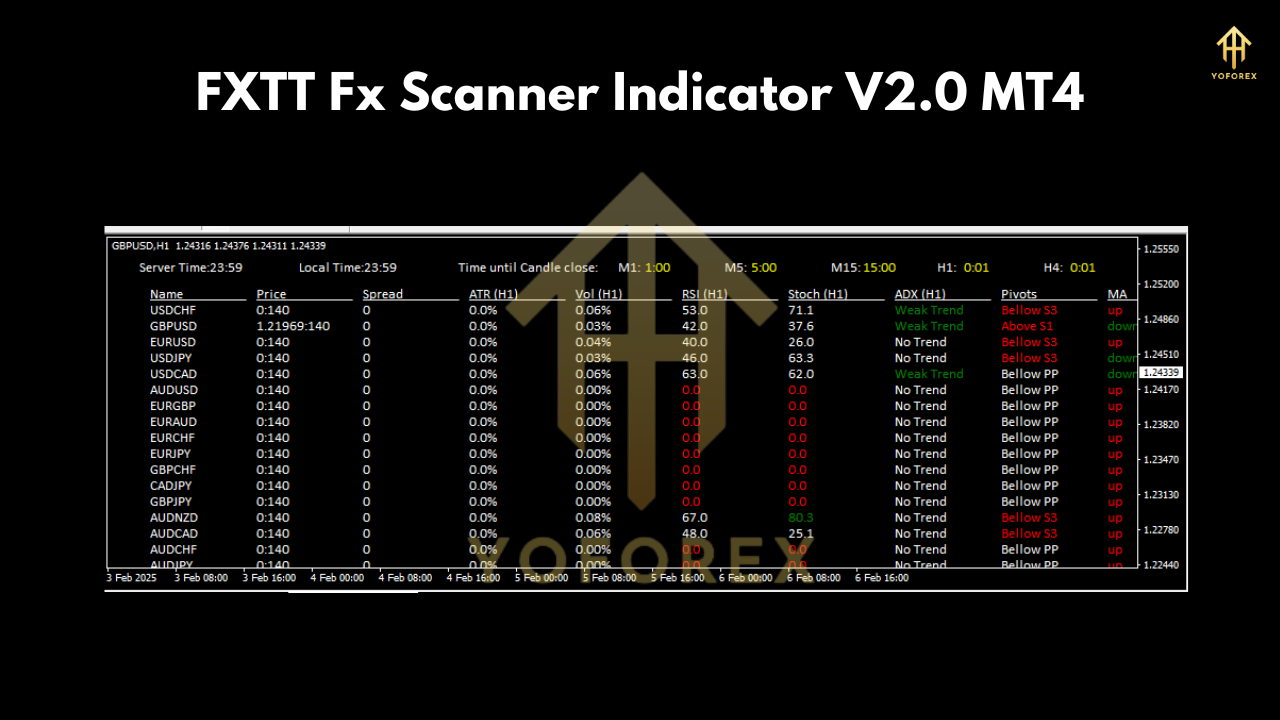
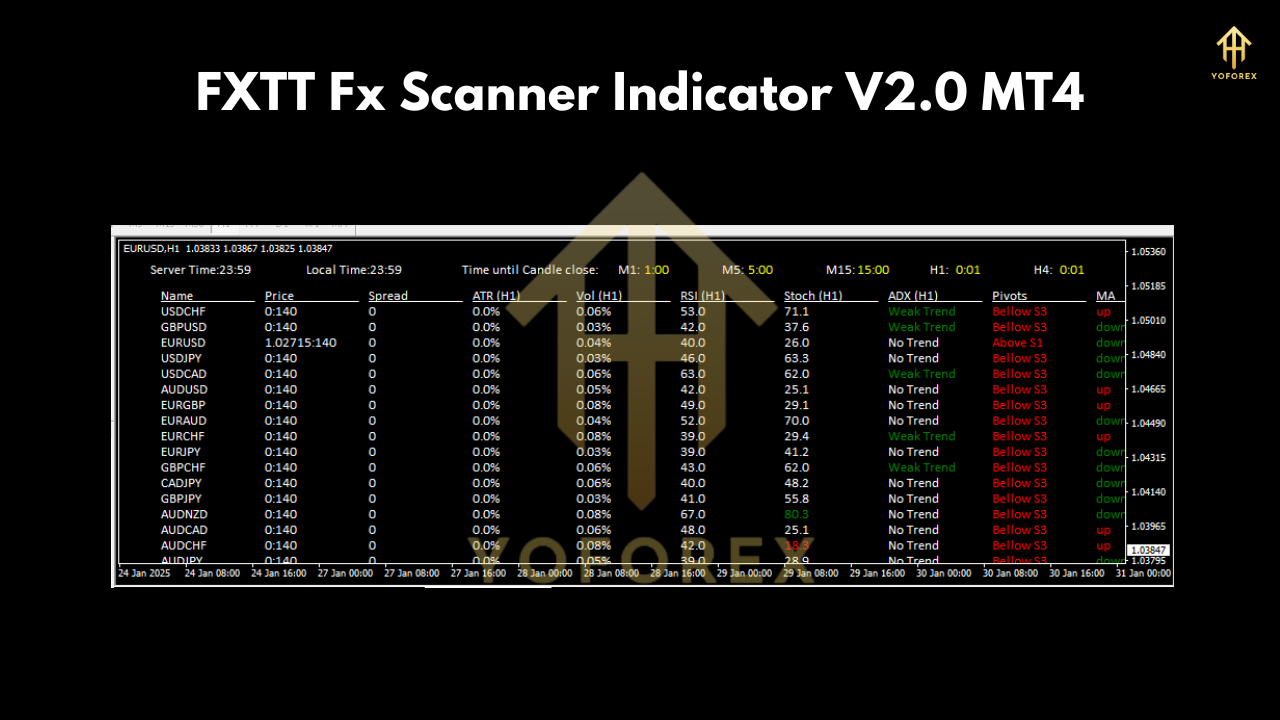
The FXTT Fx Scanner Indicator is a multi-scanner technical tool that provides a comprehensive dashboard for monitoring market conditions across multiple currency pairs. Version 2.0 brings enhanced features, improved responsiveness, and a sleek interface tailored for the H1 timeframe. It scans the market for trading opportunities, displaying critical data such as:
- Price and Spread: Real-time price updates and spread information for better trade execution.
- Trend Direction: Identifies bullish, bearish, or neutral trends.
- ATR (Average True Range): Measures market volatility to help set stop-loss and take-profit levels.
- Volume: Tracks trading activity to gauge market momentum.
- RSI (Relative Strength Index): Highlights overbought or oversold conditions.
- Stochastic and ADX: Provide additional confirmation for trend strength and momentum.
- Pivots and Moving Averages: Marks key support/resistance levels and trend direction.
This indicator is optimized for EUR/USD, GBP/USD, and USD/JPY, which are among the most liquid and volatile pairs in the forex market. It is ideal for swing traders using the H1 chart.
 Key Features of FXTT Fx Scanner Indicator V2.0
- Multi-Pair Monitoring: Simultaneously tracks EUR/USD, GBP/USD, and USD/JPY, saving time and effort.
- H1 Timeframe Optimization: Perfect for swing traders who hold positions for hours to a day.
- User-Friendly Dashboard: Displays all relevant data in an easy-to-read format, even for beginners.
- Real-Time Alerts: Sends notifications via pop-ups, emails, or push notifications when trading opportunities arise.
- Customizable Settings: Adjust parameters like ATR period, RSI levels, and moving averages to suit your trading style.
- Low Lag: Ensures fast updates, critical for time-sensitive H1 trading.
- Free Download: Available at https://example.com/download/file.zip, making it accessible to all traders.
How to Install the FXTT Fx Scanner Indicator V2.0 on MT4
Installing the FXTT Fx Scanner Indicator V2.0 is straightforward. Follow these steps to get started:
- Download the Indicator: Visit https://example.com/download/file.zip to download the indicator file (.ex4 or .mq4).
- Open MT4: Launch your MetaTrader 4 platform.
- Access the Data Folder: Click File > Open Data Folder in MT4.
- Navigate to Indicators: Open the MQL4 folder, then the Indicators folder.
- Copy the File: Paste the downloaded indicator file into the Indicators folder.
- Restart MT4: Close and reopen MT4 to load the indicator.
- Apply to Chart: Open a chart for EUR/USD, GBP/USD, or USD/JPY (H1 timeframe). Go to Insert > Indicators > Custom and select FXTT Fx Scanner V2.0.
- Customize Settings: Adjust the settings (e.g., ATR period, RSI levels) as needed and click OK.
Once installed, the indicator’s dashboard will appear on your chart, ready to guide your trading decisions.
Trading Strategies with FXTT Fx Scanner Indicator V2.0
The FXTT Fx Scanner Indicator V2.0 is versatile and can be used in various trading strategies. Below are three effective approaches for trading EUR/USD, GBP/USD, and USD/JPY on the H1 timeframe:
1. Trend-Following Strategy
- Setup: Use the indicator’s moving average and ADX to confirm a strong trend (ADX > 25).
- Entry: Enter a buy trade when the price is above the moving average and RSI is below 70 (not overbought). For a sell trade, ensure the price is below the moving average and RSI is above 30 (not oversold).
- Exit: Set take-profit at a pivot level or when ADX drops below 20. Place stop-loss below the recent swing low (for buys) or above the swing high (for sells).
- Example: On EUR/USD H1, if the indicator shows a bullish trend with ADX at 30, enter a buy trade and target the next pivot resistance.
2. Breakout Strategy
- Setup: Monitor pivot levels and wait for the price to approach a key support or resistance zone.
- Entry: Enter a buy trade when the price breaks above resistance with high volume and RSI below 70. For a sell trade, enter when the price breaks below support with high volume and RSI above 30.
- Exit: Set take-profit at the next pivot level. Place stop-loss below the breakout point (for buys) or above it (for sells).
- Example: On GBP/USD H1, if the price breaks above a pivot resistance with strong volume, enter a buy trade with a stop-loss below the pivot.
3. Reversal Strategy
- Setup: Look for overbought (RSI > 70) or oversold (RSI < 30) conditions near pivot levels.
- Entry: Enter a sell trade when RSI is overbought and the price rejects a pivot resistance. Enter a buy trade when RSI is oversold and the price bounces off a pivot support.
- Exit: Set take-profit at the next pivot level or when RSI returns to neutral (40–60). Place stop-loss above the pivot resistance (for sells) or below the pivot support (for buys).
- Example: On USD/JPY H1, if RSI is overbought at 75 and the price rejects a pivot resistance, enter a sell trade targeting the next support.
 Tips for Maximizing Profits with FXTT Fx Scanner Indicator V2.0
- Combine with Other Indicators: Use the FXTT Fx Scanner alongside tools like Bollinger Bands or MACD for confirmation.
- Practice Risk Management: Risk no more than 1–2% of your account per trade and use a minimum deposit of $200 for adequate capital.
- Backtest Strategies: Test the indicator on a demo account to understand its signals and refine your approach.
- Trade During High Volatility: Focus on the London and New York sessions for EUR/USD, GBP/USD, and USD/JPY, as these pairs are most active then.
- Stay Disciplined: Follow the indicator’s signals and avoid overtrading, especially during low-volume periods.
Why Choose FXTT Fx Scanner Indicator V2.0?
The FXTT Fx Scanner Indicator V2.0 stands out for its simplicity, versatility, and effectiveness. Here’s why it’s a must-have for forex traders:
- Beginner-Friendly: Its intuitive dashboard makes it easy for new traders to understand market conditions.
- Time-Saving: Monitors multiple pairs simultaneously, reducing manual analysis time.
- Reliable Signals: Combines multiple technical tools for accurate trade setups.
- Free Access: Download it at no cost from https://example.com/download/file.zip.
- Proven Performance: Optimized for high-liquidity pairs like EUR/USD, GBP/USD, and USD/JPY on the H1 timeframe.
Limitations and Considerations
While the FXTT Fx Scanner Indicator V2.0 is a powerful tool, it’s not a guaranteed predictor of market movements. Like all technical indicators, it has limitations:
- Lagging Signals: Some indicators (e.g., moving averages) may lag in fast-moving markets.
- False Signals: Avoid trading during low-volatility periods to reduce false signals.
- Requires Confirmation: Always use the indicator with other analysis methods (e.g., price action, fundamental analysis) for better accuracy.
To mitigate these risks, combine the indicator with sound risk management and a disciplined trading plan.
Conclusion
The FXTT Fx Scanner Indicator V2.0 MT4 is a game-changer for forex traders looking to simplify their analysis and boost their profitability. Optimized for EUR/USD, GBP/USD, and USD/JPY on the H1 timeframe, it offers a robust set of features to identify trading opportunities with ease. Whether you’re a beginner or a seasoned trader, this free tool, available at https://example.com/download/file.zip, can enhance your trading strategy.
Join our Telegram for the latest updates and support
Happy Trading


Comments
No comments yet. Be the first to comment!
Leave a Comment