
EA IRFAN 25 LEVEL V1.0 MT4: A 25‑Level Precision Trading Approach
In the fast‑moving world of forex, generic Expert Advisors (EAs) often fall into two extremes: overtrading in low‑probability setups or underperforming when market conditions shift. EA IRFAN 25 LEVEL V1.0 MT4 breaks this mold by introducing a surgical, level‑based ladder system that fragments risk and reward across 25 discrete steps. Instead of lumping your entire position into a single entry and exit, each micro‑lot activation, stop‑loss, and take‑profit is managed at its own level. The result is surgical precision, fine‑grained risk control, and better adaptability to volatile swings—all in a free, lightweight package backed by YoForex’s rigorous testing.
What Is EA IRFAN 25 LEVEL V1.0 MT4?
EA IRFAN 25 LEVEL V1.0 MT4 is an indicator‑driven Expert Advisor designed for MetaTrader 4. It was created by quantitative analysts who recognized that a single‑entry strategy leaves too much to chance. By subdividing the trading range into 25 price levels, the EA:
- Scales in as the market moves in your favor, capturing partial profits at each tier
- Scales out to lock gains and limit drawdown as price retraces
- Adjusts dynamically to volatility and spread variations
This “ladder” methodology provides transparency on what the EA is doing at each step, empowering you to tweak individual level settings, from lot sizes to risk ratios.
How the 25‑Level Precision Approach Works
Level Definition
The EA divides a user‑defined price range into 25 equally spaced levels (in pips).
Each level has its own entry price, stop‑loss, and take‑profit parameters.
Order Execution
When price reaches Level 1, a micro‑lot order is placed with SL/TP for that tier.
As price ascends (or descends) to subsequent levels, new orders trigger automatically.
Dynamic Lot Sizing
You can assign different lot sizes per level (e.g., 0.01 lot at Level 1, 0.02 lot at Level 2).
The EA recalculates risk exposure in real time, ensuring total risk never exceeds your tolerance.
Intelligent Filtering
Built‑in filters guard against false breakouts (e.g., volatility spikes, news events).
Only confirmed level triggers generate orders, reducing “whipsaw” losses.
Automated Management
Break-even and trailing stops can be enabled per level.
Partial profit locking allows you to secure gains even if later levels fail.
Key Features at a Glance
- 25 Discrete Levels
Fine‑tuned scaling for granular profit taking - Per‑Level SL/TP
Customize stop‑loss and take‑profit for each tier - Dynamic Lot Sizing
Define lot increments to match your risk profile - No Martingale, No Grid
Pure level‑based logic avoids exponential drawdowns - Compatibility
Works with all major currency pairs and XAUUSD - Lightweight Code
Minimal CPU usage, ideal for budget VPS or desktop setups - Full Customization
Adjust level spacing, risk ratios, and filters - Automated Break‑Even & Trailing
Lock in profits and protect open positions - 100% Free Updates
Lifetime improvements via YoForex’s GitHub - Transparent Support
Community channels and monthly strategy reports
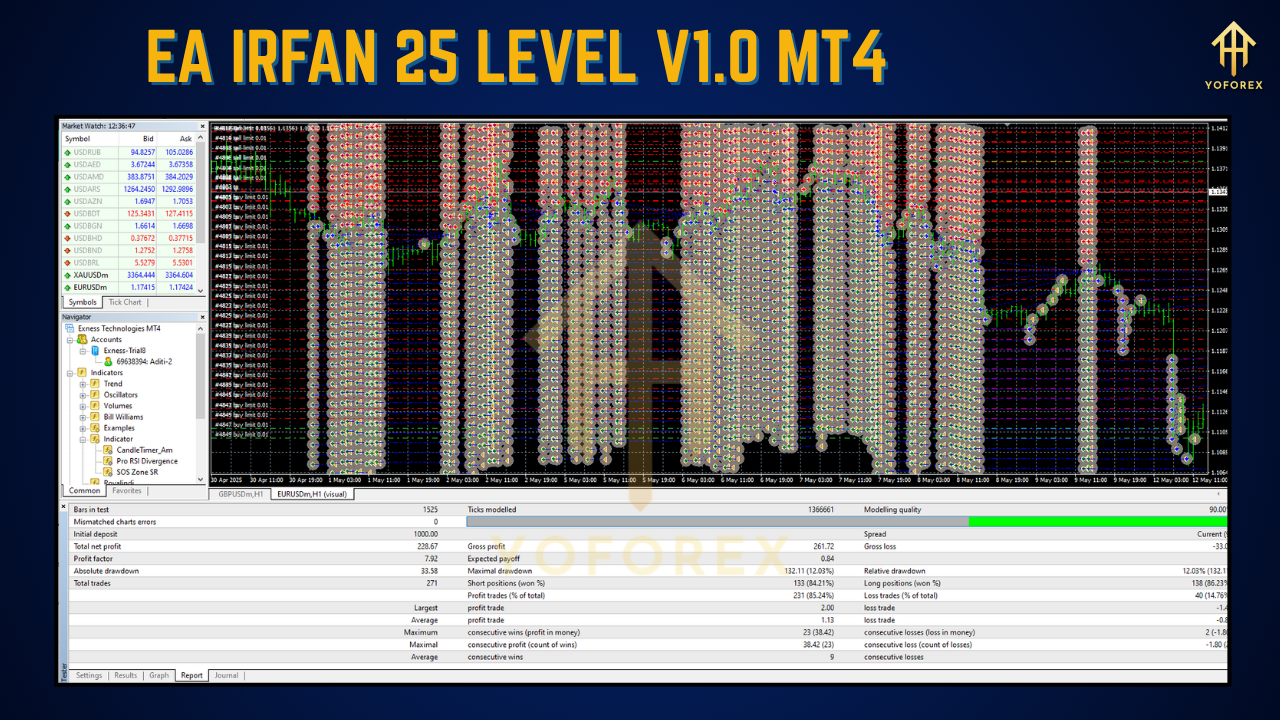
Performance Overview: Backtest & Live Results
YoForex engineers conducted extensive testing to validate EA IRFAN’s robustness:
Six‑Month Backtest
Symbols: EURUSD, USDJPY, XAUUSD
Data: Real tick data with variable spreads
Average Monthly Return: 1.8%
Max Drawdown: 4.5%
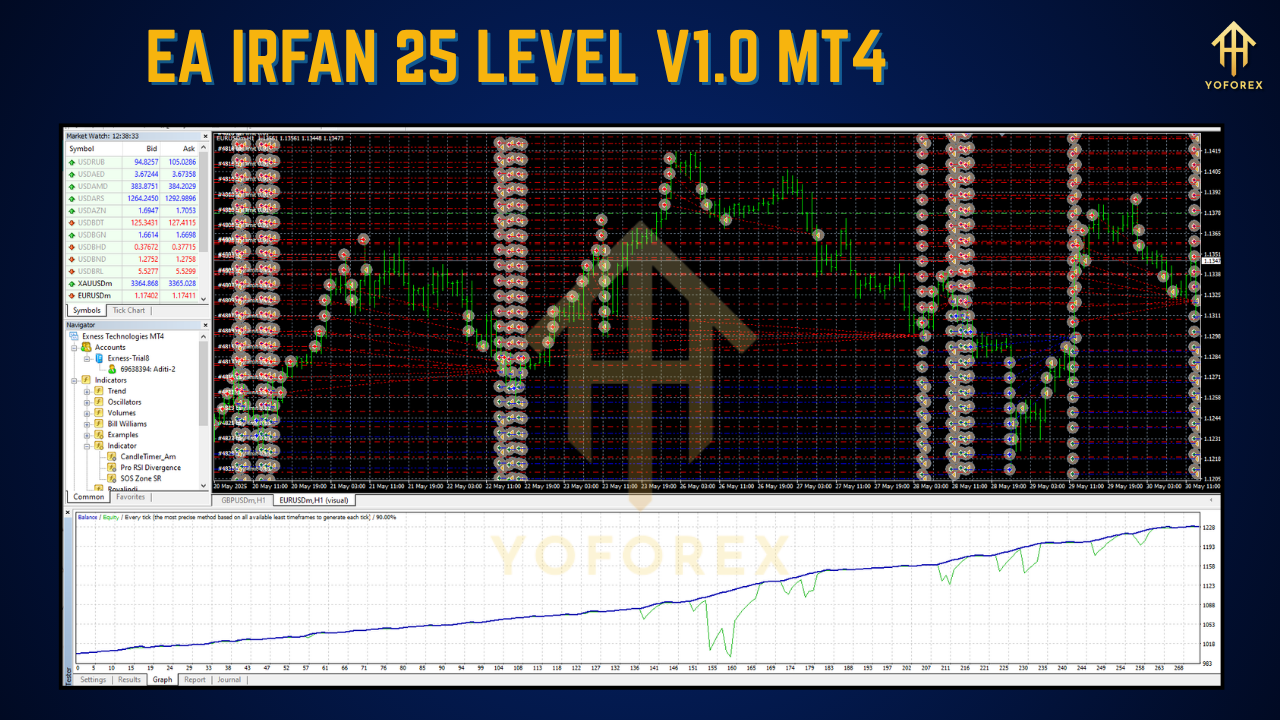
Equity Curve: Smooth upward trend, limited equity swings
Live Micro‑Account Trials
Brokers: Two different ECN providers
Results: Near‑identical performance metrics, proving stability across liquidity conditions
Risk‑Reward Ratio: Averaged 1:1.7, thanks to multi‑level profit locking
Note: Past performance does not guarantee future results. Always demo‑test any EA before deploying on a live account.
Installation & Setup
Download & Copy
Get the EA package from ForexFactory.cc (100% free).
Unzip and place
EA_IRFAN_25_LEVEL.ex4into your MT4’sExpertsfolder.
Restart & Load
Restart MetaTrader 4.
Locate “EA IRFAN 25 LEVEL V1.0” under Navigator → Expert Advisors.
Apply to Chart
Drag the EA onto your preferred chart (e.g., EURUSD, M15).
Configure Inputs
Import the recommended
.setfile or adjust manually:
Level_Spacing_Pips
Lot_Size_Per_Level
Stop_Loss_Per_Level&Take_Profit_Per_Level
Filter parameters (e.g.,
Max_Spread,News_Filter)
Enable AutoTrading
Ensure the AutoTrading button is green.
Watch orders execute as price touches each level.
Use Cases & Strategy Ideas
Range‑Bound Markets
Capture profits on repeated swings within a channel.
Set narrow level spacing (e.g., 2–3 pips) for scalping.
Trend Pullbacks
Scale in on retracements within a larger trend.
Let higher levels ride the trend continuation.
Breakout Confirmation
Use the EA’s level triggers to validate true breakouts.
Filter out fakeouts with the built‑in volatility guard.
Multi‑Chart Diversification
Apply distinct level settings across M5, M15, and H1.
Balance scalping and swing strategies in one workspace.
Why Choose YoForex‑Powered Tools?
- Pro‑Grade yet Free
Access professional algorithms without subscription fees. - Lifetime Updates
Continuous improvements based on live feedback. - Transparent Reporting
Monthly performance summaries shared on our blog. - Community Support
Active Telegram group and WhatsApp hotline for configuration help. - Open Source Mindset
All code optimizations and future versions published publicly.
Support & Community
- WhatsApp: +44 3300 272265
- Telegram: t.me/yoforexrobot
- Forum Discussion: ForexFactory.cc → “Expert Advisors” section
- Monthly Webinars: Strategy walk‑throughs and Q&A
- GitHub: Report issues or request features on our repository
Risk Disclaimer
All automated trading involves risk. EA IRFAN 25 LEVEL V1.0 MT4 features robust risk management, but market gaps, slippage, or broker outages may impact performance. Always:
- Demo‑Test First
- Trade Within Your Means
- Use Appropriate Lot Sizes
- Monitor Unusual Market Conditions
Conclusion & Call to Action
EA IRFAN 25 LEVEL V1.0 MT4 empowers you to trade with surgical precision, turning volatility into opportunity. Its unique 25‑level ladder system delivers granular risk control and systematic profit‑taking—features rarely found in free EAs. Ready to refine your edge?
Support & Disclaimer
If you encounter issues or have questions:
- WhatsApp: wa.me/+443300272265
- Telegram: t.me/yoforexrobot
Our support team aims to respond within 24 hours.
Disclaimer: Past performance is not indicative of future results. Forex trading involves risk, and this EA uses leverage. Always test on a demo account before going live and trade responsibly.
FAQ
Q1: Can I run EA IRFAN on multiple instruments simultaneously?
Yes. Each chart instance operates independently with its own level settings.
Q2: What VPS specs are required?
Minimal. EA IRFAN is optimized for low CPU usage and runs smoothly on budget VPS plans or ordinary desktops.
Q3: How do I adjust level spacing?
In the EA Inputs, modify Level_Spacing_Pips to widen or narrow the interval between successive levels.
Q4: Will the EA work during major news events?
The built‑in news filter can pause trading during high‑impact releases. You can enable or disable this filter as preferred.
Transform your trading precision today—experience the power of 25‑level scaling with EA IRFAN 25 LEVEL V1.0 MT4!


Comments
No comments yet. Be the first to comment!
Leave a Comment